Showing posts with label SQL2016. Show all posts

Wednesday, April 12, 2017

How To Generate In-Memory OLTP Migration Checklist

In-Memory OLTP, code named Hakaton is a separate database engine introduced in SQL Server 2014 and it is combined with SQL Server traditional database engine. So when you install SQL Server, you will get both database engines. Modern computers/servers are getting more physical memory (RAM). Windows Server 2016 support 24 TB of physical memory. So it is clear the future is more towards In-Memory databases regardless of database type.

I’d recommend reading Microsoft published whitepaper by Kalen Delaney on In-Memory OLTP. here                                                                                                                            
In-Memory OLTP simply means you can create memory optimized tables as well as natively compiled stored procedure. In other words, you can store the schema of the entire table and data in memory. However, it obviously has some limitations too. Those limitations will be addressed in every new release of SQL Server.

It is possible to migrate the tables and other objects in existing databases to memory-optimized structures. Since it has limitations, the first step would be to identify the list of objects which are eligible for the migration. The SSMS (SQL Server Management Studio) provides a feature (wizard) that you can use for this purpose. The below steps will go through the details of the wizard against the sample database, AdventureworksDW2016CTP3 which you can download and install.

Follow the below steps to generate the checklist.

  1. Connect to the server in SSMS.
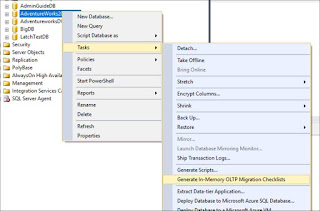
  2. Right-click on the database and select Generate In-Memory OLTP Migration Checklist option. (See below screenshot)
o
  1. Click Next on the first page of the wizard.
  2. In Choose Objects screen, you can select the tables, stored procedures or both. You also can specify a location for the checklist to be saved. Then click on Next. (See below screenshot)


  1. In Summary page, you can generate the PowerShell script for this task. This is optional. Click on Finish.
  2. It takes some time depending on the number of objects (tables, triggers, foreign keys, indexes, stored procedures, etc) in the database. Because it checks all the dependent objects against the In-Memory OLTP rules.

You can view the checklist generated by the Advisor in the location you specified in step #4.

It creates the subfolders under database name folder for each object. See below screenshot.


The contents of each folder look like below. Below screenshot displays the checklist for stored procedures.


Open each HTML file to see the details of the analysis.

I will write another blog post on how to analyze the checklist information.

Cheers!

Thursday, March 30, 2017

Developer Friendly T-SQL Enhancements in SQL Server 2016 and vNext

Both SQL Server 2016 and vNext versions have introduced many new features. T-SQL language too gets new features in each SQL Serer versions. Below two enhancements to T-SQL language is very important for DBAs and Database Developers who writes T-SQL heavily.

  1. CREATE OR ALTER

You can create SQL Server objects like below by using CREATE OR ALTER statement.

    CREATE OR ALTER PROC dbo.TestProc
    AS
    BEGIN
       SELECT @@VERSION
END

This way, you can create or alter stored procedure, function, view, and trigger.  However, this does not apply for table object.  This saves developers time tremendously   because it avoids numerous validation steps.

  1. DROP IF EXISTS

The new DROP EXISTS statements also avoids some conditional logic that you need to include to check the existence of the object before it drops.

DROP PROC IF EXISTS dbo.TestProc

This statement works with many SQL Server objects. See the below figure;

Source: MSDN

So if you’ve SQL Server 2016 or vNext in your environments, you can start using these new features right away.

Cheers!

Friday, December 2, 2016

Persistent Log Buffer with SQL Server 2016 SP1

You can get significant performance gain by just moving the existing applications to SQL Server 2016. There are several case studies to prove this story. You can even get more performance gain (2X - 4X) with combination of SQL Server 2016 SP1 and Windows Server 2016 (not yet released). This performance gain achieved through Persistent (non-volatile) Log Buffer technique. This performance enhancement has been released to SQL Server with SP1. SQL Server utilizes Windows Server 2016 direct memory access (DAX). With this new feature SQL Server can write transaction log data in memory access speed over disk IO speed earlier. With the new type of memory which is persistent, the moments SQL Server writes to log cache (memory area for t-log), the data is persistent. 

For more details:


How to interpret Disk Latency

I was analyzing IO stats in one of our SQL Servers and noticed that IO latency (Read / Write) are very high. As a rule of thumb, we know tha...